Wednesday, September 9, 2015

Pivot Function

Normalization principle dictate that we keep our tables as narrow as possible, i.e. only few columns wide to keep the table schema simple and performant.

It does create a problem when you need to display data in a columnar format or pivot format. For example take a look at the following query...

SELECT C.Name, O.Total As Total,O.Year
FROM Customers C INNER JOIN Orders O ON C.CustomerID = O.CustomerID
 

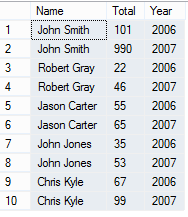
The result will look something like this...
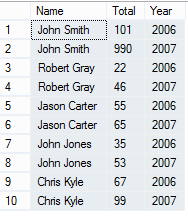


but what if you want to display the information in a columnar format, like an excel spreadsheet with Names going vertically but years going horizontally.

Using Pivot function you can achieve just that. Take a look at the query below...

SELECT * FROM
(SELECT C.Name, O.Total As Total,O.Year
FROM Customers C INNER JOIN Orders O ON C.CustomerID = O.CustomerID
) A

PIVOT
(
 
SUM(Total) FOR Year IN ([2006],[2007])

) AS TotalAmt

The result will be as follows...


 Data is displayed in much more readable and organized manner.


PIVOT function allows you to pivot a column for another column, as we did in the above example, i.e. pivot Total for Year.

You may be wondering about using nested query. If you don't use nested query you will get a duplicate field error. This is because as you can see from the previous result set, there are multiple customers with same name and we are joining two tables (Orders and Customers) on Customer ID field which results in duplicate field error when trying to pivot.

Thank you.


Monday, September 7, 2015

Transparent Data Encryption (TDE)

Yesterday, we reviewed multiple encryption strategies available to secure data. Starting with SQL Server 2008, Microsoft introduced Transparent Data Encryption (TDE). Today, we will review TDE in detail.

TDE is also knows as data at rest encryption because the data is encrypted while saving to data store using keys. Anyone without keys will be unable to use data, even if they were able to get hold of it. TDE is a real-time I/O encryption / decryption technique. When data is being saved to the data store, both data and log files are encrypted. Conversely, when being read, the data is decrypted in real time.

The encryption / decryption process uses a database encryption key, also called as DEK. This key is stored in the database boot record to ensure it is available for recovery.

Database Encryption Key is a symmetric key which is secured by a certificate stored in the master database. It could also be an asymmetric key which is protected by an EKM module. Both AES and 3DES algorithms can be used to encrypt/decrypt data at this level. TDE encryption is performed at the page level. Page is encrypted before saving to data store and decrypted when read from the data store.

If you move the database from one server to another, you must decrypt the database first, move the database, restore and then re-enable TDE on the destination server.

When you enable TDE, make sure to backup the certificate and the associated private key. If the certificate ever becomes unavailable, you will need the backups of both the certificate and the private key to read the data.

Even if you remove TDE, make sure to keep the certificate handy because some transaction logs may still be encrypted.

Below is the architectural illustration of TDE


Following commands can be used to enable TDE

USE master;
GO
CREATE MASTER KEY ENCRYPTION BY PASSWORD = '<strongpassword>';
go
CREATE CERTIFICATE MyServerCert WITH SUBJECT = 'My DEK Certificate';
go
USE <Your_Database>;
GO
CREATE DATABASE ENCRYPTION KEY
WITH ALGORITHM = AES_128
ENCRYPTION BY SERVER CERTIFICATE MyServerCert;
GO
ALTER DATABASE <Your_Database>
SET ENCRYPTION ON;
GO

Thank you.

Sunday, September 6, 2015

Data Encryption

SQL Data Encryption Techniques


With several recent high profile hacks many companies, especially the ones that operate in healthcare space or retail space are worried about whether they are HIPPA and PCI compliant.

Most organizations have taken steps to ensure physical security and have deployed robust tools such as expensive firewalls, SSL and digital code signing techniques.

But, often the data at the database layer is left un-encrypted and even though there are various options to encrypt the data, there is often confusion about the optimal strategy.

Today, we will briefly discuss various options available to encrypt the data at the database level.

  1. Transparent Data Encryption (TDE) - first introduced in SQL 2008.
  2. Custom Encryption - Programmatically encrypting sensitive data before saving to database.
  3. Using SQL Views / Triggers without having to modify your code.
  4. Using third party tools that encrypt and decrypt the data seamlessly using encryption keys.
  5. Drive Level encryption - Using third party tools or built in OS level encryption you can encrypt the drive where the data is stored.
Options 2 thru 5 are self-explanatory, in the next post we will discuss TDE in more detail.

Thank you.
 

Saturday, August 4, 2012

Duplicate a table with or without the data

I have often been asked to purge data from a table, but if you work with databases, you know never to purge anything from the production database without having a restore plan, in case you need it back. I have used several tricks to ensure I don't lose data.

I've seen some folks export the data out to a spreadsheet, make a backup of the database etc. While it works, it is time consuming specially if you need to just preserve one table. A quick solution is to create another copy of the original table and then delete data from the main table. In order to quickly create an identical copy of the table along with data, you can run SELECT * INTO query.

For example, if I want to duplicate Orders table in Northwind database, I can run the following command...

SELECT * INTO OrdersCopy FROM Orders

What if I only want to create schema of a table and not copy the content. To achieve this, you can pass a false condition to WHERE clause in above script. For example...

SELECT * INTO OrdersCopy FROM Orders WHERE 1 = 0;

Any False condition will do and not just WHERE 1 = 0.

Basically SELECT * INTO statement first creates the schema and then evaluates the WHERE condition to copy data from the source to the destination table. You can also copy records that satisfy a certain criteria.

Thank you.

Monday, July 16, 2012

Difference between COALESCE and ISNULL

I have often been asked about the difference between ISNULL and COALESCE. In most cases they work the same, but there are some fundamental differences. Let's review some of them...

ISNULL is a T-SQL function while Coalesce is an ANSI Standard.

ISNULL only takes two arguments and basically evaluates the first argument for null value, if true, it returns the second value back. For example, if you execute the following command

SELECT ISNULL(NULL,NULL) you will get NULL as your result set. Now try executing the same statement with COALESCE -- SELECT COALESCE(NULL,NULL), you will receive the following error

At least one of the arguments to COALESCE must be a typed NULL. 

What does this error mean? Does it mean you can't pass two null arguments to Coalesce? What it really means is that at least one of the argument must be of a particular data type even if it is NULL. For Example, I can do the following..

DECLARE @First Varchar(10)
DECLARE @Second varchar(10) and execute the following statements, they will all work fine.
SELECT COALESCE(@First,@Second)
SELECT COALESCE(NULL, @Second)
SELECT COALESCE(@First,NULL)

Let's run another test...

DECLARE @First char(2) and run the following statements
SELECT ISNULL(@First,'This is a Test') -- returns Th
SELECT COALESCE(@First,'This is a Test') -- returns This is a Test

The data type in ISNULL is determined by the first argument. In this case, the data type of the first argument is Char(2) so it only returns 2 characters of the non-null argument which is the second argument. Coalesce on the other hand determines the data type based on the precedence. Check out the following article about data type precedence ( http://msdn.microsoft.com/en-us/library/ms190309.aspx).

Depending on how you use one or the other, you could actually get different results or an error. For example, if I run the following code...

DECLARE @First varchar(4)='Test'
DECLARE @Second INT = 1
SELECT ISNULL(@First,@Second)
SELECT COALESCE(@First,@Second)


ISNULL will work just fine but COALESCE will generate an error. This is because an INT has higher precedence than varchar and COALESCE will try to convert @First to INT, generating an error. If @First is NULL, then it will work fine and return you the value of @Second.

COALESCE can take more than 2 arguments and will work like Switch/Case (Select/Case) working down the cases until it finds the non-null value or until it has evaluated all the arguments.

Performance wise they both are same in most situations, except there are cases where SQL Server generates different execution plan based on whether you use ISNULL or COALESCE. This generally happens when you are using scalar sub-queries as part of your arguments to ISNULL or COALESCE.

Thank you.

Monday, July 9, 2012

T-SQL Best Practices

When writing a T-SQL either as an ad-hoc query or a stored procedure, besides ensuring the queries are fully optimized, you should keep few things in mind. Although none of these are required, but trust me someone reading your queries in the future will thank you for it, and it may even save you a headache in the future. I don't have many, but there are few guidelines / best practices that I try to adhere to.

Indentation
 Properly Indenting your query makes it so much easier to read and / or troubleshoot. 
 For example, consider the following query..
SELECT FirstName,LastName,EmailAddress,Address1,Address2,Phone,Fax FROM Customers


Can be rewritten as...
SELECT
    FirstName,
    LastName,
    EmailAddress,
    Address1,
    Address2,
    Phone,
    Fax
FROM Customers

It is certainly easier to read and you can quickly figure out what columns are being selected. You can make it even more useful by making the following change...


SELECT
    FirstName
    ,LastName
    ,EmailAddress
    ,Address1
    ,Address2
    ,Phone
    ,Fax
FROM Customers

By using "," as a prefix in subsequent columns, you can easily comment out a line containing the column that you don't want your query to return instead of having to rearrange it.


Using Square Brackets
Although square brackets are not necessary unless you have a space in column name, using it ensures that if your column name ever becomes a reserved word in SQL, you query won't break. For example, you can write the above query as follows...

SELECT
    [FirstName]
    ,[LastName]
    ,[EmailAddress]
    ,[Address1]
    ,[Address2]
    ,[Phone]
    ,[Fax]
FROM [Customers]

Using Statement Terminators
Using semicolon (;) at the end of your SQL Statement. If you use C# or C++ or Java for application development, this may be second nature, but not so much for VB Developers. Although SQL Server currently doesn't require semicolon in most cases, it may change in the future as it is part of the ANSI SQL-92 standard. So to avoid future headaches, always use semicolon. Thus the proper way to write the above query would be...

SELECT
    [FirstName]
    ,[LastName]
    ,[EmailAddress]
    ,[Address1]
    ,[Address2]
    ,[Phone]
    ,[Fax]
FROM [Customers];


If you have multiple statements in your query, use semicolon after each one. For example, I can add SET NOCOUNT ON in my query above.

SET NOCOUNT ON;
SELECT
    [FirstName]
    ,[LastName]
    ,[EmailAddress]
    ,[Address1]
    ,[Address2]
    ,[Phone]
    ,[Fax]
FROM [Customers];

Capitalize all T-SQL Keywords
Capitalizing T-SQL Keywords such as SELECT, FROM, WHERE, JOIN etc. makes it so much easier to read your query and to differentiate between the T-SQL keywords and your own columns etc.

Happy Programming!


Friday, July 6, 2012

SQL SERVER - Little things can save you a big headache

Recently I came across a situation where someone was running a query, basically copying data from one table to another.

The query was simple enough. Basically it was using a fast forward cursor, copying one record from one table into another table. Using SCOPE_IDENTITY, the query retrieved the identity value of the newly inserted record and then inserted another record in a child table, using newly generated identity key. There were several hundred millions of records in the table from which the data was being moved to a new table. Whether this could have been done another way is not the topic for today.

In this particular instance, the query was running in Query Analyzer and it will run for a while, but then will throw an out of memory exception. Since the query didn't track what records were inserted already in the new table before out of memory exception was thrown, the developer truncated the new table and started all over again, only to hit the same issue again.

The reason query was throwing out of memory exception was because the query didn't have SET NOCOUNT ON clause at the beginning. As a result, the query was outputting messages for each statement in this query, not only resulting in memory consumption but also degrading the performance and increasing the network traffic. SET NOCOUNT ON basically prevents the sending of DONE_IN_PROC messages to the client.

The query need not run in a loop like above or in query analyzer to make use of SET NOCOUNT ON. If you don't need messages being returned from the SQL Server or aren't capturing them, be sure to add this clause to your stored procedures.

Thank you.

Monday, July 2, 2012

SQL Server - Degree of Parallelism

In SQL Server 2008, Microsoft introduced a concept called max degree of parallelism. Max degree of parallelism allows the engine to take advantage of all the available processors on the server up to 64 processors to execute a single SQL statement. By default, SQL Server is configured to use all available processors, however, there may be instances where you want to limit the number of processors a query should use. For example, you may have a low priority SQL agent job running in the background and you want to limit it to only use one processor. You can set max degree of parallelism to 1.

The query below will only use up to 2 processors for parallel operation regardless of the number of processors available.

USE AdventureWorks
GO
SELECT ProductID, OrderQty, SUM(LineTotal) As Total
FROM Sales.SalesOrderDetail 
WHERE UnitPrice < $10.00
GROUP BY ProductID, OrderQty
ORDER BY ProductID, OrderQty
OPTION (MAXDOP 2)
GO

To set the option for SQL Server to always use up to X number of processors, you can use SP_Configure.

For example, the following query forces SQL engine to only use 4 processors.

USE Master
GO
SP_Configure 'Show Advanced Options', 1
GO
RECONFIGURE
GO
SP_Configure 'Max Degree of Parallelism', 4
GO
RECONFIGURE
GO

Default "Max Degree of Parallelism" option is 0, which means use all available processors up to 64.

Thank you.

Thursday, June 28, 2012

SQL 2012 (Denali) - Paged Query Results

Anyone who has been developing web based or even windows based systems must have gone through the pain of fetching few records at a time from the database.

Suppose your grid view displays 20 records per page. Your option was to either fetch all records on every grid page and every time user changed the page, make another trip and fetch all records again (or save everything in view state / session) - not an ideal solution. Your other option was to get a list of all primary / identity keys and then pass a set of keys to the query to only fetch the records that pertain to those keys. For example, get keys 1 - 20 on page 1, 21 - 40 on page 2 and so on. But what if someone deleted, say record #22 from the database? Another implementation I have seen is where code passes the page number and number of records that each page displays and the stored procedure applies some complex logic to figure out what records to send back. Using ROW_NUMBER() and CTE was a better alternative, but it was still not very intuitive and easy to use.

SQL 2012 introduced Ad-Hoc paging, allowing you to only fetch the appropriate number of records. Two clauses "OFFSET" and "FETCH" make this happen. Fetch clause fetches only the next X number of records you want to retrieve and OFFSET tells the query to start from the record # Y.

For example, suppose I have 1000 users in my table and my grid only shows 10 users at a time. I can pass two parameters to my query and it will return me correct 10 users every time.
CREATE PROCEDURE getPagedRecords

@Page INT = 1,
@RecordsPerPage INT=10

AS
BEGIN
    DECLARE @Offset INT
    SET @OffSet = Page * @RecordsPerPage

    SELECT 
        UserID,
        FirstName,
        LastName,
        EmailAddress 
    FROM Users 
    ORDER BY UserID
    OFFSET @Offset ROWS
    FETCH NEXT @RecordsPerPage ROWS ONLY;
END

You can even use expressions in OFFSET and FETCH Clause such as @Offset - 1 and @RecordsPerPage   - 1.

You don't have to have paging in grid view to make use of this. Often time you may need X number of records from the middle of the result set, where this could be very helpful.

For Fetch to return expected set of records every time, you obviously have to make sure other routines aren't deleting / inserting records in the middle which may cause an unexpected behavior. For example, let's say your OFFSET clause tells the query to start at record # 11, but what if someone deleted a record say at #5 after you retrieved first 10 records? Record number 11 is now what would have been record number 12, thus your query will not return you one record (original record at #11 but now at # 10).

Thank you.

Monday, June 25, 2012

SQL Server 2012 (Denali) Sequence Object

In addition to several enhancements in SQL 2012 - (some of which we will cover in subsequent posts), one of the key feature introduced is a sequence object.

Think of sequence object as an identity field on steroids. An identity field allows you to generate an auto number incremented by whatever increment value you desire (default is one) every time a record is inserted in a table. But, identity field is specific to a table, just like any other field defined in a given table. Additionally, if you delete the previous record, the identity value associated with the deleted record is lost forever until you do something to reseed it. Once the identity field hits the maximum limit (depends on the data type of this field), you've got a problem and you must reseed the table to start over or do something else.

Sequence object can help you mitigate this problem somewhat. First, let's briefly review this object. The Sequence object is created independently of a table and can be used across multiple tables.

For example - I can create a sequence object called OrderNumber, have it start with 1000 and increment by 1.
Create SEQUENCE [dbo].[OrderNumber]
as int
START WITH 1000
INCREMENT BY 1;


Now this sequence object is available to be used in multiple tables.

Let's imagine I have a table called OrderHeader and OrderDetails in my database.
CREATE TABLE [dbo].[OrderHeader](
    [OrderNumber] [int] NOT NULL,
    [OrderDate] [smalldatetime] NOT NULL,
    [StatusID] [int] NOT NULL
) ON [PRIMARY]

CREATE TABLE [dbo].[OrderDetails](
    [OrderNumber] [int] NOT NULL,
    [ItemID] [int] NOT NULL,
    [Quantity] [int] NOT NULL,
    [Price] [money] NOT NULL
) ON [PRIMARY]

Instead of inserting record in OrderHeader and then using SCOPE_IDENTITY() or some other method to get the OrderNumber before inserting the record in OrderDetails table, I can use the sequence "OrderNumber" I created above and insert the same number in both tables.
DECLARE @OrderNumber INT
SELECT @OrderNumber = NEXT VALUE FOR dbo.OrderNumber
INSERT INTO Orders(OrderNumber,OrderDate,StatusID)
VALUE (@OrderNumber,GetDate(),1)

INSERT INTO OrderDetails(OrderNumber,ItemID,Quantity,Price)
VALUE (@OrderNumber,100,10,'2.25')

NEXT VALUE FOR gives you the next available sequence number. Every time you call it, the object will return the next available number, so if you want to use the same number in multiple tables, you have to be careful to call it only once.


Another nice feature of the sequence object is that you can reset it. As in my example above, if you are deleting previous records, then you know your previous order numbers are becoming available. After you have reached fairly large number, you can start over. You obviously have to ensure you don't reset sequence and then try to use the new sequence number which may already exist in your table.

There are two ways to reset the sequence (dropping and recreating is a third way). One, by defining a maximum value for the sequence when you created it and another by altering an already created sequence.
Create SEQUENCE [dbo].[OrderNumber]
as INT
START WITH 1000
INCREMENT BY 1
MINVALUE  1000
MAXVALUE  1000000
CYCLE


The OrderNumber sequence in above example will recycle once it hits 1000000.

ALTER SEQUENCE OrderNumber
 RESTART WITH 1000 ;


As you can see, Sequence object is quite flexible and if used judiciously can serve as a nice tool. Sys objects provide additional methods to get the range of values or to find out the current sequence value etc.

Thank you.

Friday, June 22, 2012

SQL Server - Checking Where an Object is used

As databases grow in size and complexity, often there are dead objects that are left behind. By dead, I mean these objects are no longer being used, but everyone is afraid to drop them for fear of breaking something. SQL Server provides a simple way to determine where an object is being used so you can decide whether it is needed or not. SQL Server will tell you whether your object is being used in a function or stored procedure or a view etc. it obviously can't tell you whether another application is referencing such an object. So, before you delete an object if the query below doesn't return anything, further research may be necessary.

The script below will accept the object name and list all other objects that are using/referencing this object.


    --Declare a variable or alternatively you could create 
    --a stored procedure and pass this as a parameter.
    DECLARE @objectName nvarchar(4000)
    --name of your object.
   SET @ObjectName = 'MyObject'
   SELECT
        S.NAME,
        C.Text

    FROM SysObjects S
    INNER JOIN SysComments C
        ON S.ID = C.ID
    WHERE 
        C.Text LIKE '%' + @ObjectName + '%'

For example, if I run the above script in Northwind database to check where "Categories" table is being used, I get the following result.


Happy Coding!

Thank you.

Saturday, June 16, 2012

SQL Server Pivot Function

In previous post we discussed exporting data from SQL Server into an excel file and how you can pivot the data etc. Pivoting is basically a way for you to convert rows into columns. Starting with 2005, SQL Server introduced PIVOT function which allows you to retrieve columns in tabular format. PIVOT function doesn't work on certain data types such as XML.

In the past, suppose you wanted to group employees by the city they reside in. You can use Group By clause to get the count of the number of employees by city, but such a query will result in each city as one row and you will have to do something extra to convert them into columns. The query below will return the number of employees that reside in three cities with the count for each city appearing in one row.

USE AdventureWorks
GO

SELECT City,COUNT(*) AS [Count] FROM HumanResources.vEmployee 
WHERE City IN ('Monroe','Redmond','Seattle')
Group By City

The result will look like this

CityCount
Monroe14
Redmond21
Seattle44

Suppose you want to pivot this data so that each city appears as a column. You can modify the above query and use PIVOT function.

Use AdventureWorks
GO
SELECT [Monroe],[Redmond],[Seattle]
FROM
(
    SELECT E.City FROM HumanResources.VEmployee E
) C
PIVOT
( 
 COUNT (City)
 FOR City
 IN ([Monroe],[Redmond],[Seattle])
 ) AS PivotTable;

Now the result will look like this
MonroeRedmondSeattle
142144

You may be wondering about missing WHERE clause. Basically FOR City IN () under PIVOT function takes care of filtering your data based on your criteria. This query works but the nested query still returns all rows. You can add a WHERE clause in your nested query to only return rows that satisfy your criteria. Above query can be rewritten as follows...
Use AdventureWorks
GO
SELECT [Monroe],[Redmond],[Seattle]
FROM
(
    SELECT E.City FROM HumanResources.VEmployee E
    WHERE City IN ('Monroe','Redmond','Seattle')
) C
PIVOT
( 
 COUNT (City)
 FOR City
 IN ([Monroe],[Redmond],[Seattle])
 ) AS PivotTable;

PIVOT is a useful function but not very intuitive, as you can see above, it takes a minute to make sense of it. Question for you guys - have you used PIVOT function before and if so, how did you use it?

Thank you.

Thursday, June 14, 2012

Exporting data from SQL Server to Excel

Excel is a very powerful tool and it can come in handy if you just want to build a quick report from your SQL Server database. In this post, we will discuss ways to export data and create a quick employee report.

1. Fire up your Excel and browse to data tab, click on From Other Sources and select From SQL Server.


2. Enter the SQL Server name. If your SQL Server's instance is other than default, you will also need to enter the instance name.


You will have to do this only once. After successfully connecting to your database, you can save the connection string and in the future just click on Existing Connections from the data tab to reuse the connection.

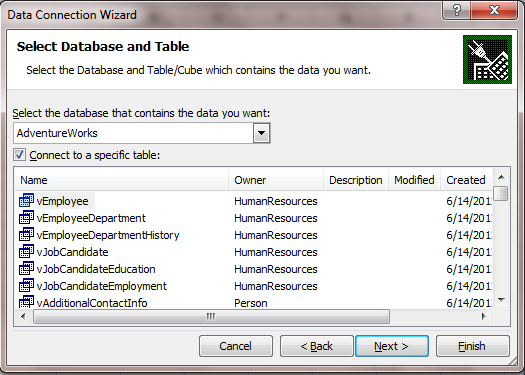
3. After entering the information, click on Next and select the database you want to export data from. In this example, we are going to use AdventureWorks. Select a table or a view to retrieve data from and click Next.

4. This is your chance to save your connection string for any future usage. Rename the connection string to a more appropriate name and click on Finish.

5. You are now ready to export data. You can either export table as it is saved in the database or create a pivot report or a pivot report with chart. In the example, I chose the second option.


6. Properties tab allows you to set certain parameters. Generally defaults work OK for most situations.


7. When you click on OK, Excel lists all the fields that are available in your selected table or view and you can select the ones you want to show up on report. As you select a column, you will notice that the value is added in the spreadsheet. The order you want the data to appear in the report is the order you should select the columns. For example, if you want Last Name to appear before First, select Last Name first and then select First Name column.

8. Close the Fields List and here is your nice little report.

Thank you.

Monday, June 11, 2012

Compressing your data


If deleting data is not an option, SQL Server 2008 and 2012 provide another option to compress individual tables by compressing rows or pages.

Before you compress a particular table, it may be prudent to know which table will provide you the biggest gain. In my previous post I talked about running a script to determine the tables with largest amount of data which can be used to determine which tables to tackle first.

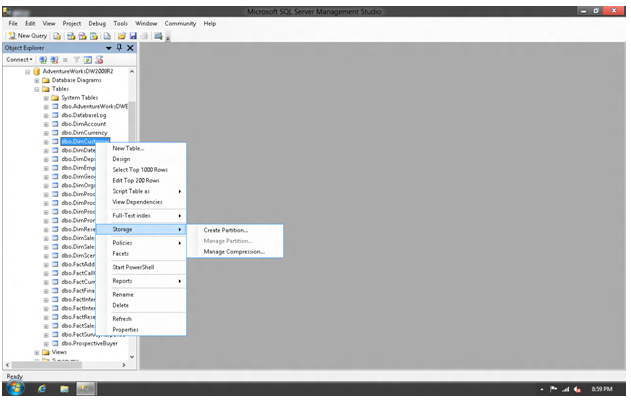
Let's assume you have determined the table(s) to compress, fire up your management studio and then right click on the table > Storage > Manage Compression


Click on Compression and select Compression Type - Row Level Data Compression or Page Level Data Compression.

After you select compression type, you can click on Calculate which will show you how much you will gain.
  • Row Level Data Compression: This compression turns the fixed length data types into variable length data types and frees up empty space. As you can image, a table with more columns of char/nchar data type will yield more space. Row level compression can also ignore zero and null values resulting in additional space savings. 
  • Page Level Data Compression: When you choose this compression type, it starts with row level data compression and then adds additional compression by performing two extra layer of compression...
    • Prefix Compression
      • SQL Server analyzes the repeated pattern at the beginning of the values in each column and substitutes them with an abbreviated reference which is stored in the compression information structure. This type of compression only works on one column.
    • Dictionary Compression
      • It works similarly to prefix compression except that it searches for repeated patterns anywhere in a page and replaces them with an abbreviated reference and stores the reference information in the compression information structure.

How much savings you will gain by the page level compression depends on the patterns of the data. Repeatable patterns will result in more savings, whereas random patterns will result in less savings.

As you can imagine, this will result in performance degradation, but how much and whether it is acceptable will depend on your environment.

Thank you.


Thursday, June 7, 2012

Determining SQL Table Size

You may come across a situation where you need to shrink your database by selectively deleting data from some tables.

It sure would be nice to know which tables are the biggest data hog and see if you can delete records to free up some space and then shrink the database. There is indeed a nice little script that you can use to determine the table size and act accordingly.

CREATE TABLE #tmpTable
(name SYSNAME, 
rows CHAR(11), 
reserved VARCHAR(18),  
data VARCHAR(18), 
index_size VARCHAR(18), 
unused VARCHAR(18)
)  
EXEC sp_msforeachtable 'INSERT INTO #tmpTable EXEC sp_spaceused ''?''' 
SELECT * FROM #tmpTable ORDER BY data desc 
DROP TABLE #tmpTable 

If you are running SQL 2008 (or SQL 2012 enterprise edition, then you can also compress individual tables. We will discuss table compression in next post.

Thank you

Tuesday, June 5, 2012

Checking Foreign Key References

You may come across a situation where you need to check which tables are connected to a particular via a foreign key referential constraint. You may need this information when you are trying to delete one or more records or truncate a table.

Below is a script that you can use to check all the tables that are related to the table in question. In this example I am checking for the table "Employees"

SELECT f.name AS ForeignKey,
OBJECT_NAME(f.parent_object_id) AS TableName,
COL_NAME(fc.parent_object_id,
fc.parent_column_id) AS ColumnName,
OBJECT_NAME (f.referenced_object_id) AS RefTableName,
COL_NAME(fc.referenced_object_id,
fc.referenced_column_id) AS RefColumnName
FROM sys.foreign_keys AS f
INNER JOIN sys.foreign_key_columns AS fc
ON f.OBJECT_ID = fc.constraint_object_id

WHERE OBJECT_NAME (f.referenced_object_id)='Employees'

Below is a result showing the three tables it is connected with.

ForeignKey TableName ColumnName RefTableName RefColumnName
FK_Emp_Addresses EmpAddresses EmployeeID Employees EmployeeID
FK_Emp_Phones EmpPhones EmployeeID Employees EmployeeID
FK_Emp_Attributes EmpAttributes EmployeeID Employees EmployeeID

Thank you.

Monday, June 4, 2012

Change Database Compatibility Level

Recently I came across a database environment that had SQL Server 2005 (don't ask me why), but the databases (there were about 50 databases) were running at SQL Server 2000 compatibility level. After ensuring that nothing will break if I changed a database's compatibility level to 2005, I decided to go ahead and run a script to change all databases' compatibility level to 2005.

Below is a script that you can run in your environment.
DECLARE  @tmpTable TABLE (Name varchar(50),compLevel INT,StateDesc varchar(50))

INSERT INTO @tmpTable(Name,CompLevel,StateDesc)
SELECT Name,Compatibility_level,State_Desc FROM sys.databases 

DECLARE @DBName varchar(50)
DECLARE curDBName CURSOR FOR
    SELECT Name FROM @tmpTable WHERE StateDesc='ONLINE'
OPEN curDBName
FETCH NEXT FROM curDBName INTO @DBName
WHILE @@FETCH_STATUS=0
    BEGIN
        DECLARE @compLevel INT
        SELECT @compLevel=compLevel FROM @tmpTable WHERE Name=@DBName
        If @compLevel=80
            BEGIN
            Exec sp_dbcmptlevel @DBName,90
            END
        FETCH NEXT FROM curDBName INTO @DBName
    END
CLOSE curDBName
DEALLOCATE curDBName

You can change the version to move from 2000 to 2008 or 2005 to 2008, but before you do that, make sure that your database will not break. One way to check would be to create database scripts by logging into Management Studio > Right Click on Database > Tasks > Generate Scripts. Make sure you select all objects i.e. tables, views, stored procedures, functions etc. and then save scripts. Run these scripts to create an empty database in the SQL environment you are upgrading your database to. If there are no errors, there is a good chance that your production database will work fine.

Thank you.


Saturday, June 2, 2012

Creating a Composite Foreign Key

In previous post we discussed various types of primary keys such as natural key, surrogate key and composite key. To recap, a composite primary key is a combination of more than one columns. Ordinarily a single column primary key is preferable but there are situation as we discussed previously when it makes sense to create a composite primary key.

Naturally, if you want to use composite primary key as a foreign key in other tables, you will have to create the columns in the secondary table that corresponds to the primary table. For example, you have a table called Customers and you have a composite primary key "FirstName, LastName" in this table. To use this key as a foreign key in another table say "CustomerAddresses" you will have to create the FirstName and LastName columns in CustomerAddresses table and then add the referential integrity. (I am not saying this is a good way to design your table schema, this is just an example).

Below is the script that you can run to create a foreign key in CustomerAddresses table.
ALTER TABLE dbo.CustomerAddresses
   ADD CONSTRAINT FK_Customer
   FOREIGN KEY(FirstName, LastName)
   REFERENCES dbo.Customers(FirstName, LastName)


You can use the same script to create foreign key constraint on any other columns. For example, if your Customers table has "CustomerID" as primary key, then you would add "CustomerID" column in CustomerAddresses table and then use the script above replacing "FirstName, LastName" with "CustomerID".

Thank you.

Monday, May 21, 2012

Surrogate / Natural / Composite Primary Keys

I have heard several arguments both for and against the composite primary keys. First, let's understand the type of primary keys that a table may have...

  • Surrogate Key - This is non essential data element that simply represent a record in the table but is not part of the business data. For example, an auto-generated identity key or a GUID.


  • Natural Key - One or more data elements that are part of the data and is defined as a primary key. For example - ItemNumber or ItemDescription in an InventoryItems table.


  • Composite Key - When two or more keys are joined to form the primary key. It generally is a combination of two or more natural keys.

This is not cast in stone, but most developers would prefer a surrogate key such as an identity column as a primary key which makes it easier to join multiple tables for querying purpose etc. It also makes it easier if you are using code generators such as nHibernate to generate your data access layer. But, if you ask a DBA, you may get a different answer. They much rather see natural key as a primary key, even if you have to use composite key to define it.

Personally, I like having an auto generated identity column as a primary key in base tables such as Employees with an EmployeeID as a primary key and Stores table with StoreID.

For linking tables, I much rather use a composite key instead of an identity column. For example, if I have EmployeeStores table which links Employees and Stores, instead of having an identity column EmployeeStoreID, I rather have EmployeeID and StoreID as a composite primary key. You may be wondering why not use an identity key instead?

Let's assume your application has a constraint i.e. an Employee can only be assigned to one store. If you have EmployeeStoreID as your primary key, the following records are perfectly legal...

EmployeeStoreIDEmployeeIDStoreID
110020
210030

This doesn't satisfy business constraint, does it? Sure, your application should enforce this but what if someone enters data directly? You can also enforce this by creating a unique constraint on EmployeeID and StoreID, but to me that is another layer of complexity. If I made EmployeeID and StoreID as a composite primary key, I wouldn't have this problem.

Linking tables like these are generally not involved in complex join operations so having a composite key shouldn't force you to write more complex queries. Code generators that I am aware of or have worked with also support composite primary keys.

There is still one issue though that I haven't addressed yet. What if you want to update a record, how do you determine which record to update?

For example, assume an employee can be assigned to multiple stores. consider the following table...

EmployeeIDStoreID
10020
10030
11030
12040

Employee 100 is assigned to stores 20 and 30. Now imagine this employee no longer works in store 20 but instead now works in store 40. The manager now updates this employees record via UI and changes his/her store from 20 to 40.

How would you know which record to update? Do you update the 1st record (correct one) or do you update second record (storeID=30) since your stored procedure likely received EmployeeID=100 and StoreID=40?

There are couple of ways to get around this problem.

  • You can have your application send the stored procedure both old store ID and new store ID and you would know which record to update.
  • You can have the EmployeeStoreID as an auto increment column and your application can pass this ID to your stored procedure to update the record.

Personally, I prefer option #1. If you are using typed data sets or even data access layer using code generators, you will have access to row state which will give you the original and updated values that you can pass to your stored procedure. Alternatively, you can code in a way to keep track of old value and pass it along with the new value.

I generally don't post as a programmer on this blog, I have another blog for that, but here I felt it necessary to discuss a bit about programming. I hope you've enjoyed reading this as much as I've enjoyed writing it. Your comments are appreciated.

Thank you


Thursday, May 17, 2012

Using Temp Tables across Stored Procedures

I often come across a situation where it is hugely beneficial to create a temporary table, populate it with necessary information and then have another stored procedure use this temporary table.

In the past, developers were mostly relegated to one of the following scenarios...

Option 1
  • Create a temporary table in your database.
  • Call the stored procedure which can use this table just like any other table.
But, you must delete this table after you are done, otherwise next execution may result in an error (if you are creating table without checking whether it already exists).

Option 2
  • Create a temporary table with # prefix 
  • Call the stored procedure which can use this table just like any other table.
Table created with # or ## prefix is only available for that session. As long as you did everything within the same connection, you are good. Once you close the connection, the table will be automatically deleted.

This works, however creating temporary tables is generally not recommended because every time a temporary table is created, stored procedure must be recompiled and query execution plan must be generated. Moreover, if your stored procedure is used in a multi-user environment, a copy of temporary table will be created for every user - (you can avoid this by creating a global temp table (with ## prefix), but then you must account for the fact that several users may share the same data which may not be desirable). 

Table variables introduced in SQL 2005 solve this problem to a great extent although there may be some performance issues because you can't create non-clustered indexes on table variables. Further, you can't use table variables created in one stored procedure in another because they will be out of scope.

Creating Temp Table
CREATE TABLE #tmpTable(ID INT, Name varchar(100))

Creating Table Variable
DECLARE @tmpTable TABLE(ID INT, Name varchar(100))

As I mentioned earlier, you can't create a table variable in one stored procedure and use it in another. SQL Server 2008 introduced a Table variable type that you can use to pass a table variable from one stored procedure to another.

Create a Table Data Type

/****** Object:  UserDefinedTableType [dbo].[TableType]    Script Date: 05/17/2012 23:07:07 ******/
CREATE TYPE [dbo].[TableType] AS TABLE(
    [CustomerID] [int] NOT NULL,
    [Name] [varchar](255) NULL,
    [City] [varchar](50) NULL,
    [State] [char](2) NULL,
    [Zipcode] [varchar](20) NULL
)
GO

Create a Stored Procedure that declares a variable of this type - Here I am declaring @Customers variable and populating it with data.

ALTER PROCEDURE sp_GetCustomers

AS
BEGIN
    DECLARE @Customers AS TableType
    INSERT INTO @Customers(CustomerID,Name,City,State,ZipCode)
    SELECT C.CustomerID,C.FirstName + ' ' + C.LastName,A.City,A.State,A.ZipCode
    FROM Customers C INNER JOIN CustomerAddress A ON C.CustomerID=A.CustomerID
    EXEC sp_GetCustomersWithAddresses @Customers
    
END

Pass this variable to another Stored Procedure - You must pass a table type variable as READONLY

CREATE PROCEDURE sp_GetCustomersWithAddresses
@Customers TableType READONLY
AS
BEGIN
    SELECT * FROM @Customers
END

You can use table type variable in your applications as well and pass it around like a regular SQL data type.

Thank you.