SQL Server provides three backup options - Full backup, Differential backup and Transaction Logs backup. Today, we will review the three backup strategies and key differences between them.
Full Backup
Full backup is just that, a full backup of your database at a point in time. You can restore the full backup on the same or a different SQL Server.
Differential Backup
Differential backup backs only the changes since the last full backup. The benefit of differential backup is that it is very fast and takes less space since you are only backing up the changes.
Differential backup has a backup chain which starts from the last full backup. All differential backups are from the previous full backup. It is possible to take another full backup without breaking the differential backup chain, i.e. to have it continue from the previous full backup. If you take a full backup with COPY_ONLY option, you will not break the differential backup chain, but without the COPY_ONLY option, the previous differential backup chain will be broken and a new chain will start from the most recent backup.
You can perform a restore at point in time by restoring a full backup and then applying the most recent differential backup.
Transaction Logs
Transaction Logs are the changes since the last transaction log backup. I have seen some confusion about whether transaction log backups are from the last full backup or from the last transaction log backup. If you are taking full database backup for the very first time, you transaction log back up chain will start after the full backup. Any subsequent full or differential backups will not break the log chain and the next transaction log backup will be from the last transaction log backup and not the last full backup.
The transaction log backup only works in Full and Bulk Logged recovery model and the only way to break the log chain is by either switching the recovery model to Simple or if you choose to override existing backup set when creating a full backup media set.
If your database is set to full or bulk logged recovery model, you must take frequent log backups otherwise your log file won't truncate, filling up your hard drive.
It is good to use all three backup schemes in your database environment to ensure you keep the restore media set or files as current as possible, so you can restore to a point in time and minimize data loss.
Thank you.
Tuesday, April 10, 2012


Saturday, April 7, 2012
Configuring SQL Server Maintenance Plan
I may not have explicitly mentioned earlier, but all the examples, and the content that I write generally applies to SQL Server 2008. In most cases it will be true for SQL Server 2005 as well, but not always. For example, in one of the blog about compressing data during backup, I discussed "WITH COMPRESSION" command to use during backup. This command was only introduced with SQL Server 2008.
Today, we will review another facility available in SQL 2008 (also available in SQL 2005, but some of the features may not be the same) called Maintenance Plan. Maintenance Plan allows you to setup certain maintenance tasks by using SQL Management Studio with ease. This comes specially handy when you have multiple databases on the same server and need to setup maintenance plan such as nightly backup for all the databases at once.
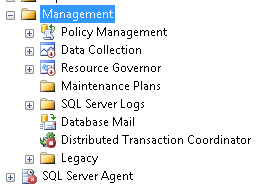
1. Connect to your SQL instance via Management Studio and go to Management > Maintenance Plans.


Today, we will review another facility available in SQL 2008 (also available in SQL 2005, but some of the features may not be the same) called Maintenance Plan. Maintenance Plan allows you to setup certain maintenance tasks by using SQL Management Studio with ease. This comes specially handy when you have multiple databases on the same server and need to setup maintenance plan such as nightly backup for all the databases at once.
1. Connect to your SQL instance via Management Studio and go to Management > Maintenance Plans.

2. Right click on Maintenance Plan and either select New Maintenance Plan or Maintenance Plan Wizard. Maintenance Plan Wizard is quite powerful and walks you through selecting available maintenance plans and configure it. In this example, we will use the first option and setup our own maintenance plan. Select "New Maintenance Plan" and name your plan appropriately, which will open design surface and a list of available maintenance plan.


3. Drag one or more tasks that you want to configure in this maintenance plan. We will configure two tasks - database backup and check database integrity task.
Check Database Integrity
It is often a good idea to check the database integrity immediately before or after the backup.
Drag the task on the design surface and then right click > Edit to configure your databases. The resulting UI will allow you to select one or more databases. You can also check all databases (this is helpful if you are going to add databases in future and don't want to keep adding new databases to this list, alternatively if you have too many databases, you may want to configure few databases in one task).

Check the "Ignore databases where state is not online" to only perform integrity check when database is online. Click on OK to save the change.
From the design surface top menu, click on the calendar icon to setup the schedule for this task. Name your schedule and setup appropriate schedule. Clock on OK to save and close the schedule window.

Configure Database Backup
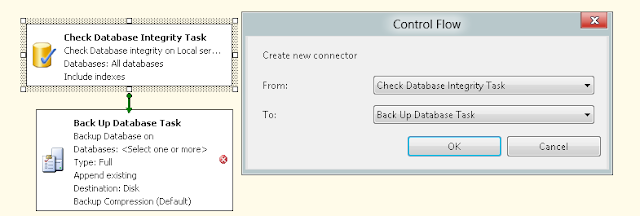
Repeat the same steps and drag the database backup task and configure it. Again right click on the task and configure your options. Here you can configure whether you want full, differential or transaction log backup, select one or more databases and define the location where you want to save the backup files. There is also an option called "Verify Backup Integrity" this shouldn't be confused with Database Integrity task which we configure in above step.
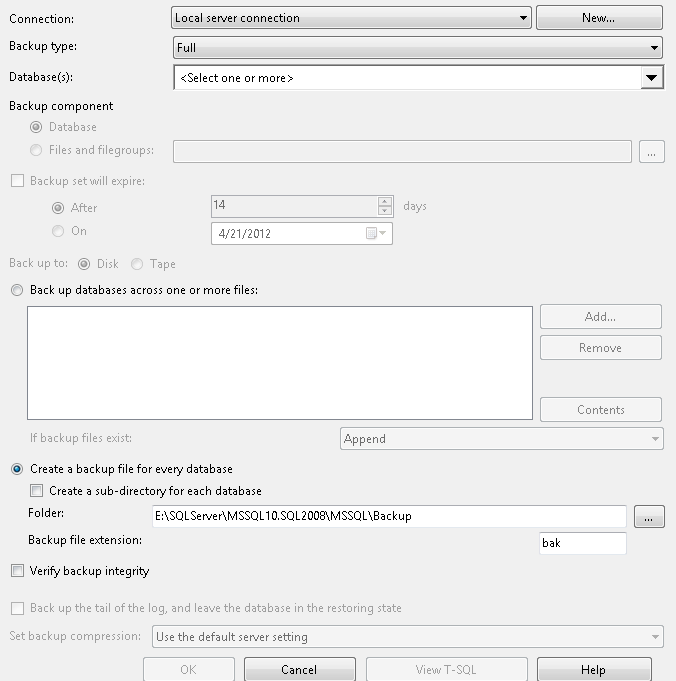
In this example, we want to ensure the integrity check is performed first before the database backup. Right click on either of the two task and select "Add Precedence Constraint" from the context menu and select the precedence you want.
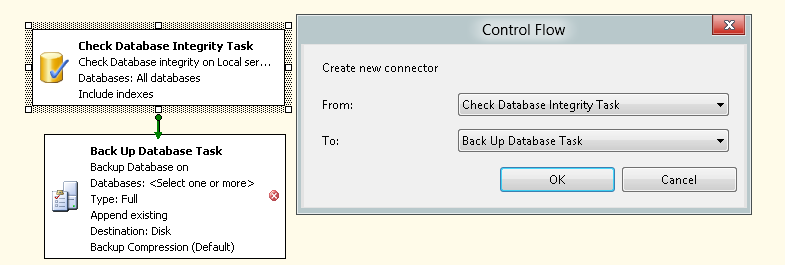
That's all there is to it. Once you save your plan, SQL Server will automatically create a SQL Agent job to run your plan at the scheduled time.
If I had database mail setup, I can also add a third task "Notify Operator Task" as the last step which can send a notification email in the event of the task failure. See my previous post to learn about configure your SQL Server to send emails.
Thank you.
Wednesday, April 4, 2012
Database Normalization - Third Normal Form
In previous two posts we discussed First Normal Form and Second Normal Form. Today, we will discuss Third Normal Form.
Third Normal Form (3NF)
This rule breaks down the table structure a bit further. For a table to be in 3NF, it must also satisfy 1NF and 2NF. To make a 2NF table satisfy 3NF, remove the columns that don't fully depend on the primary key.
Imagine you have a payroll application which records the total hours an employee worked, the pay rate and total pay for the week. The following table schema can be used...
PayRoll
Third Normal Form (3NF)
This rule breaks down the table structure a bit further. For a table to be in 3NF, it must also satisfy 1NF and 2NF. To make a 2NF table satisfy 3NF, remove the columns that don't fully depend on the primary key.
Imagine you have a payroll application which records the total hours an employee worked, the pay rate and total pay for the week. The following table schema can be used...
PayRoll
- EmployeeID
- WorkedDate
- HoursWorked
- PayRateID
- Total
Let's see if this table satisfies 1NF and 2NF. There is no duplicate data in the same row. The Payroll table is associated to Employee table via EmployeeID and to PayRates via PayRateID. It has no redundant data, has a primary key (EmployeeID and WorkedDate), and foreign keys (EmployeeID and PayRateID). Thus, all conditions for 1NF and 2NF are satisfied.
What about 3NF? Is there any field here that doesn't depend on Primary Key? HoursWorked is fully dependent on EmployeeID and WorkedDate. Different Employees could work different number of hours on different dates. Also, PayrateID is fully dependent on Primary Key as well.
At first it may appear that PayrateID doesn't depend on WorkedDate but rather only on EmployeeID because an Employees' pay will be same day after day. But what if the Employee works on a holiday when they will be paid time and a half?
What about Total column? Total column is really HoursWorked * PayRate, hence it is a computed column and as such isn't fully dependent on primary key. For this table to be in 3NF, this column must be removed. So, where do you store this column? Actually no where. This is a computed column and you should compute it on the fly when retrieving the data.
What about 3NF? Is there any field here that doesn't depend on Primary Key? HoursWorked is fully dependent on EmployeeID and WorkedDate. Different Employees could work different number of hours on different dates. Also, PayrateID is fully dependent on Primary Key as well.
At first it may appear that PayrateID doesn't depend on WorkedDate but rather only on EmployeeID because an Employees' pay will be same day after day. But what if the Employee works on a holiday when they will be paid time and a half?
What about Total column? Total column is really HoursWorked * PayRate, hence it is a computed column and as such isn't fully dependent on primary key. For this table to be in 3NF, this column must be removed. So, where do you store this column? Actually no where. This is a computed column and you should compute it on the fly when retrieving the data.
As I mentioned in the first post about Normalization, the normalization goes up to 6NF and more normalization types may still be possible, but 3NF is generally the standard for most databases.
Thank you.
Monday, April 2, 2012
Database Normalization - Second Normal Form
In previous post we discussed the concept of Normalization and First Normal Form. Today, we will review Second Normal Form. You may want to refresh previous post before continuing on.
Second Normal Form (2NF)
2NF takes this concept a bit further. This rule states that any data that is in multiple rows of the same table should be moved to a new table and the two tables should be joined via a foreign key. Basically, the idea is to reduce data redundancy by extracting redundant data and moving it elsewhere. Let's imagine you have a customers table that has the following columns
Customers
Customers
- CustomerID
- FirstName
- LastName
- Address
- City
- State
- PostalCode
- Country
Sure, you will have more than one customer from the same city, even more from the same state and definitely more from the same country. You may possibly have many customers from the same postal (zip) code. As you enter customers in this table, you are duplicating all this data i.e. City, State, PostalCode, Country etc. This table is not in 2NF. To make it 2NF compliant, create a new table and store City, State, PostalCode, Country. Let's call this table Addresses. This table has the following columns
Addresses
Addresses
- City
- State
- PostalCode
- Country
What columns do you think could be redundant here? Sure PostalCode won't be, but what about City? A city could have multiple postal codes? Definitely a State can have multiple cities and Country will have multiple states. A good schema for all the tables may be the following...
Customers
- CustomerID
- StreetAddress
- CityID
CityAddress
- CityID
- City
- PostalCode
- StateID
- CountryID
States
- StateID
- State
Countries
- CountryID
- Country
Notice, one table resulted in 4 different tables. It is definitely more complex but more flexible. You can even pre-populate States and Countries in advance.
This schema also satisfies second rule of 2NF i.e. the related tables should be related by foreign key. CityID is a foreign key in Customers, StateID, CountryID are foreign keys in CityAddress table.
We will discuss 3NF in future post.
Thank you.
Saturday, March 31, 2012
Database Normalization - First Normal Form
So far we focused on database administration and management. Moving forward, we will focus on database design, development and database performance in terms of using proper data query etc.
Today, we will review database normalization. Everyone familiar with RDBMS is probably also familiar with database normalization, but it is good to review it before we embark on database design.
Normalization:
Normalization is a way to arrange your database schema in such a way as to minimize data redundancy and duplication. For example, if you have two tables in your database - Customers and Orders. If your database is not normalized, you may store Customer Name in both Customers and Orders tables to relate the order to a customer. Apart from storing the same information twice, you also have a real problem where data could get out of sync. If your customer gets married and changes her last name, you must update her name in both tables. One of the key strength of relational databases over flat flies such as text file is their ability to relate the data across tables without having to duplicate it, hence the term "Relational".
Types of Normalization
The inventor of relational model, Edgar F. Codd defined the first, second and third normal form or 1NF, 2NF and 3NF respectively. Later on, Codd and Boyce defined the Boyce-Codd Normal Form (BCNF) also called 4NF. 5th and 6th normal forms (5NF, 6NF) were defined later on. Generally, most database adhere to 3rd Normal Form and in most cases a 3NF will also adhere to 4NF and 5NF (but not always).
When you are designing a database, care should be taken to design your database as normalized as possible. However, normalization comes at a cost, and you may have to selectively de-normalize a few tables. In some schemes such as data warehousing, you keep your design denormalized for performance reasons and primarily because you are typically not updating the data in a data warehouse.
A well normalized database not only reduces the data anomalies and redundancies, it also makes future modifications to the database easier. For example, let's assume you have a table that stores 4 phone numbers and all numbers are stored in columns of a single row, i.e. one column for each phone number. What would happen if you have to now record 5th phone number? You have to modify your table and add a 5th column to store the 5th number and since not all users will have 5 numbers, you will have a null values in several columns for most of your users.
First Normal Form (1NF)
1NF has two rules - First rule says that we do not duplicate data in the same row of a table. Recall the above example, i.e. you store 4 phone numbers for every user in 4 columns of the same row. But not all users will have all 4 numbers resulting in lot of null values (hence duplicate data). Adding a 5th phone number will require table schema modification. So how do we solve this? Well, you can create a table called PhoneNumbers with two columns
Today, we will review database normalization. Everyone familiar with RDBMS is probably also familiar with database normalization, but it is good to review it before we embark on database design.
Normalization:
Normalization is a way to arrange your database schema in such a way as to minimize data redundancy and duplication. For example, if you have two tables in your database - Customers and Orders. If your database is not normalized, you may store Customer Name in both Customers and Orders tables to relate the order to a customer. Apart from storing the same information twice, you also have a real problem where data could get out of sync. If your customer gets married and changes her last name, you must update her name in both tables. One of the key strength of relational databases over flat flies such as text file is their ability to relate the data across tables without having to duplicate it, hence the term "Relational".
Types of Normalization
The inventor of relational model, Edgar F. Codd defined the first, second and third normal form or 1NF, 2NF and 3NF respectively. Later on, Codd and Boyce defined the Boyce-Codd Normal Form (BCNF) also called 4NF. 5th and 6th normal forms (5NF, 6NF) were defined later on. Generally, most database adhere to 3rd Normal Form and in most cases a 3NF will also adhere to 4NF and 5NF (but not always).
When you are designing a database, care should be taken to design your database as normalized as possible. However, normalization comes at a cost, and you may have to selectively de-normalize a few tables. In some schemes such as data warehousing, you keep your design denormalized for performance reasons and primarily because you are typically not updating the data in a data warehouse.
A well normalized database not only reduces the data anomalies and redundancies, it also makes future modifications to the database easier. For example, let's assume you have a table that stores 4 phone numbers and all numbers are stored in columns of a single row, i.e. one column for each phone number. What would happen if you have to now record 5th phone number? You have to modify your table and add a 5th column to store the 5th number and since not all users will have 5 numbers, you will have a null values in several columns for most of your users.
First Normal Form (1NF)
1NF has two rules - First rule says that we do not duplicate data in the same row of a table. Recall the above example, i.e. you store 4 phone numbers for every user in 4 columns of the same row. But not all users will have all 4 numbers resulting in lot of null values (hence duplicate data). Adding a 5th phone number will require table schema modification. So how do we solve this? Well, you can create a table called PhoneNumbers with two columns
- Name
- PhoneNumber
Now you can have as many phone numbers per user. But, this is not 1NF yet. The second rule states that each row in a related table should have a unique (primary key). You could say that we can make PhoneNumber a primary key. But what if the same phone number is shared by two users? How about making Name and Phone Number (composite key) as a primary key? Well, close but what if two users who share the same phone number happen to have the same name? To make this table 1NF, we have to have a truely unique key. How about adding an identity field and making it a primary key? That will ensure every record has a unique key and will make our table 1NF.
In next post, we will discuss Second Normal Form (2NF).
Thank you.
Thank you.
Sunday, March 25, 2012
Using Unicode Data Types
In previous post, we discussed Collation and how non-Unicode character data is interpreted based on the collation type used. We also discussed how each collation type uses a specific code page. It is possible for one code page to implement multiple collations. But if your application supports international users, it becomes increasingly difficult to find a collation that will support your entire user base.
Another issue is that some characters cannot be encoded with 1 byte which is used in non-Unicode scheme to encode each character. 1 bye can only represent 256 different characters but some languages such as Kanji (Japanese) or Hangul (Korean) have thousands of characters that must be encoded by 2 bytes.
To rephrase, a non-Unicode encoding scheme encodes each character with 1 byte and can only encode 256 characters. A Unicode encoding system encodes each character using 2 byte and is capable of encoding over 65000 characters. (You can use a non-Unicode encoding system to encode a character that requires 2 bytes, in which case SQL Server will use double byte character set (DBCS) code page).
A non-Unicode scheme is more universal and SQL Server doesn't use code pages to interpret non-Unicode characters. For every non-Unicode character data type in SQL Server, there is an equivalent Unicode character data type (Char > nChar, varchar > nvarchar, text > ntext). If all the SQL data type variables in your application and stored procedures also use Unicode data types, there won't be a need to perform character translations, resulting in performance gain and all the users anywhere in the world will see the same characters.
SQL Server itself stores all the system catalog data such as table, view and stored procedure names in Unicode columns (checkout views/tables/system stored procedures in Master DB).
Unicode standard is maintained by Unicode Consortium and SQL Server supports the Unicode Standard Version 3.2.
Performance Impact
When you declare a column with a Unicode data type, all the characters (regardless of whether they can be represented by 1 byte or require 2 byte) will be stored using 2 bytes, which results in doubling the storage size. For example, a varchar column can store a maximum of 8000 characters (size of a datapage), nvarchar can only store a maximum of 4000 characters. Besides the storage limitation, whether Unicode storage will have performance impact largely depends on your specific situation.
For example, if you define non-Unicode data type but use Windows Collation, SQL Server will use Unicode sorting rules, which are much more resource intensive and complex. So, the performance impact between non-Unicode but with Windows Collation and Unicode will be same. If you did however use non-Unicode data type but with SQL Server collation, sorting and table scan is less resource intensive and faster. Additionally, Unicode data types sorting be slower when you are sorting lots of data because the charaters are stored in double-bytes vs. single byte. Other performance impact could come from conversion between Unicode and non-Unicode if your application uses non-Unicode data types and SQL uses Unicode data types.
Non-Unicode collation is generally good if your application will only be used by the users that can be supported by SQL Server Collation. If you must use Windows Collation or if you must offer universal support, it is best to use Unicode data types.
Subscribe to:
Posts (Atom)