Saturday, April 21, 2012

SQL Server Views

So far we have been discussing database management, backup, transactions, log shipping etc. In most places developers are generally not concerned with these tasks; but they fall under the domain of DBAs.  We will now turn our attention to the database development, primarily the tasks that are in the domain of a developer. Although admittedly, today's topic could go either way.

In this post, we will take a look at views and how you can create views to simplify some of the complex operations. Views are logical representation of your schema. They hide the underlying complexities of your database schema, table relationships etc.

For example, below is a subset of tables from my database with related tables tied together via referential integrity.


Let's assume you want to run the following query...

SELECT C.FirstName,C.LastName,Count(O.OrderID)As TotalOrders,S.FirstName,S.LastName
FROM Customers C INNER JOIN Orders O ON C.CustomerID=O.CustomerID
INNER JOIN SalesPerson S ON O.SalesPersonID=S.SalesPersonID
Group By C.FirstName,C.LastName,S.FirstName,S.LastName

Even though this query only joins three tables, it is quite complex. What if you can create a view that abstracts all this information and your application can simply use the view to get the same results instead of using this query.

CREATE VIEW view_Orders

AS
SELECT C.FirstName As CustomerFirstName,C.LastName As CustomerLastName,
Count(O.OrderID)As TotalOrders,S.FirstName As SalesFirstName,
S.LastName As SalesLastName FROM Customers 
C INNER JOIN Orders O ON C.CustomerID=O.CustomerID
INNER JOIN SalesPerson S ON O.SalesPersonID=S.SalesPersonID
Group By C.FirstName,C.LastName,S.FirstName,S.LastName
GO

Now, I can simply write a query against this view which will return me same results as the query above

SELECT * FROM view_Orders

In many ways, views are pseudo-tables. You can open a view in design mode and it will show you the tables that are used in that particular view and relationship between them. For example, if I right click on the view I created above and select design, I will see something like this, showing three tables by their Alias name. Also notice that the columns this view is returning are checked and the column which is being computed (OrderID) has a function sign on right hand side.


While a view allows you to use many clauses available with SELECT such as GROUP BY, TOP and functions such as Count, Sum etc. you can't use ORDER BY Clause, unless you use TOP. For example, If I change my above view to something like this...

CREATE VIEW view_Orders

AS
SELECT C.FirstName As CustomerFirstName,C.LastName As CustomerLastName,
Count(O.OrderID)As TotalOrders,S.FirstName As SalesFirstName,
S.LastName As SalesLastName FROM Customers C 
INNER JOIN Orders O ON C.CustomerID=O.CustomerID
INNER JOIN SalesPerson S ON O.SalesPersonID=S.SalesPersonID
Group By C.FirstName,C.LastName,S.FirstName,S.LastName 
ORDER BY C.FirstName
GO

I will get an error. But I can use ORDER BY Clause if I want to return TOP x number of rows like this...

CREATE VIEW view_Orders

AS
SELECT TOP 10 C.FirstName As CustomerFirstName,C.LastName As CustomerLastName,
Count(O.OrderID)As TotalOrders,S.FirstName As SalesFirstName,
S.LastName As SalesLastName FROM Customers C 
INNER JOIN Orders O ON C.CustomerID=O.CustomerID
INNER JOIN SalesPerson S ON O.SalesPersonID=S.SalesPersonID
Group By C.FirstName,C.LastName,S.FirstName,S.LastName 
ORDER BY C.FirstName
GO

If you want to order result set returned by a view, you can always supply ORDER BY clause in your query

CREATE VIEW view_Orders ORDER BY CustomerFirstName

Views also allow you to add certain options when creating them. The two most important once are WITH SCHEMABINDING and WITH ENCRYPTION.

If you create a view with SchemaBinding, you will not be able to alter the schema of any tables that are associated with this view without first dropping the view  or altering the view, removing SchemaBinding option. For example, above view can be created as


CREATE VIEW view_Orders WITH SCHEMABINDING

Also, you cannot use SchemaBinding unless you use the two part table name i.e. schema name.table name. In my previous example, all tables have dbo schema, so I will modify the above statement like this...

CREATE VIEW view_OrdersWITH SCHEMABINDING

AS
SELECT TOP 10 C.FirstName As CustomerFirstName,C.LastName As CustomerLastName,
Count(O.OrderID)As TotalOrders,S.FirstName As SalesFirstName,S.LastName As SalesLastName
FROM dbo.Customers C INNER JOIN dbo.Orders O ON C.CustomerID=O.CustomerID
INNER JOIN dbo.SalesPerson S ON O.SalesPersonID=S.SalesPersonID
Group By C.FirstName,C.LastName,S.FirstName,S.LastName ORDER BY C.FirstName
GO

You can also Encrypt view by using WITH ENCRYPTION. When a view is encrypted, you cannot see it either in design mode or generate a create  / alter / drop and create script. The only script you can create is Drop.  An encrypted view cannot be un-encrypted.

CREATE VIEW view_OrdersWITH SCHEMABINDING, ENCRYPTION

AS
SELECT TOP 10 C.FirstName As CustomerFirstName,C.LastName As CustomerLastName,
Count(O.OrderID)As TotalOrders,S.FirstName As SalesFirstName,S.LastName As SalesLastName
FROM dbo.Customers C INNER JOIN dbo.Orders O ON C.CustomerID=O.CustomerID
INNER JOIN dbo.SalesPerson S ON O.SalesPersonID=S.SalesPersonID
Group By C.FirstName,C.LastName,S.FirstName,S.LastName ORDER BY C.FirstName
GO

Partitioned Views
A partitioned view is defined as a view that selects data from multiple tables that have the same structure. The data is said to be partitioned, hence the term partitioned. The data is combined together using UNION ALL. The two tables can be on the same server or even on different servers.

Views are powerful feature in the sense that they abstract away some of the underlying complexities and simplify working with data.

Although views are generally used for selecting data, you can use them to update/insert data, but you are limited in what you can do when inserting/updating data via views. In next post we will discuss using views to insert/update data.

Thank you


Saturday, April 14, 2012

Log Shipping Configuration - Things to watch out

Recently I came across a situation where a server was configured to log ship. Everything was setup properly and the primary server had security rights to copy transaction log files to the secondary server.

Once configured, log shipping would work for a day and restore the logs to the secondary database as you would expect, but then it will start failing. Based on the error message, it was clear that log shipping chain was being broken somehow.

The person in charge of the database management had disabled differential backups erroneously thinking they were somehow breaking the log chain.

Remember that full backups and differential backups do not break transaction log chain. The only way you can break the log chain is either by switching the database to simple recovery model (which will truncate the log and break the chain) or if you take a backup outside of the log shipping backup process.

Log shipping consists of the following main operations:

  • Backup Transaction Log
  • Copy it to the secondary destination server (You may configure so that the backup file is created on the secondary server and this step won't be necessary).
  • Restore the Transaction Log to the secondary database (on the secondary database).
Log shipping simply creates a transaction log backup from the last log based on LSN and restore must happen in that order, i.e. previous log must be restored first and so on. Naturally, if an outside process takes a transaction log backup, it will break the log chain and any log restores without this backup will fail. The only way to recover would be to find the missing log backup or start all over.

Indeed that was the case here. Even though there wasn't another transaction log backup process, there was a shrink log file job configured to run nightly and as part of this process, the job was first creating a backup and then shrinking the log file.

Transaction log backups will automatically truncate the log file (although it may not happen right away) but file generally won't shrink, so if you are low on disk space it is good practice to shrink the log file periodically, but you shouldn't be taking the backup, if you already have transaction log backup or log shipping configured elsewhere.

To know more about transaction log shipping and how to configure it, check out this post.

Thank you.

Tuesday, April 10, 2012

Full vs Differential vs Transaction Log Backup

SQL Server provides three backup options - Full backup, Differential backup and Transaction Logs backup. Today, we will review the three backup strategies and key differences between them.

Full Backup
Full backup is just that, a full backup of your database at a point in time. You can restore the full backup on the same or a different SQL Server.

Differential Backup
Differential backup backs only the changes since the last full backup. The benefit of differential backup is that it is very fast and takes less space since you are only backing up the changes.

Differential backup has a backup chain which starts from the last full backup. All differential backups are from the previous full backup. It is possible to take another full backup without breaking the differential backup chain, i.e. to have it continue from the previous full backup. If you take a full backup with COPY_ONLY option, you will not break the differential backup chain, but without the COPY_ONLY option, the previous differential backup chain will be broken and a new chain will start from the most recent backup.

You can perform a restore at point in time by restoring a full backup and then applying the most recent differential backup.

Transaction Logs
Transaction Logs are the changes since the last transaction log backup. I have seen some confusion about whether transaction log backups are from the last full backup or from the last transaction log backup. If you are taking full database backup for the very first time, you transaction log back up chain will start after the full backup. Any subsequent full or differential backups will not break the log chain and the next transaction log backup will be from the last transaction log backup and not the last full backup.

The transaction log backup only works in Full and Bulk Logged recovery model and the only way to break the log chain is by either switching the recovery model to Simple or if you choose to override existing backup set when creating a full backup media set.

If your database is set to full or bulk logged recovery model, you must take frequent log backups otherwise your log file won't truncate, filling up your hard drive.

It is good to use all three backup schemes in your database environment to ensure you keep the restore media set or files as current as possible, so you can restore to a point in time and minimize data loss.

Thank you.


Saturday, April 7, 2012

Configuring SQL Server Maintenance Plan

I may not have explicitly mentioned earlier, but all the examples, and the content that I write generally applies to SQL Server 2008. In most cases it will be true for SQL Server 2005 as well, but not always. For example, in one of the blog about compressing data during backup, I discussed "WITH COMPRESSION" command to use during backup. This command was only introduced with SQL Server 2008.

Today, we will review another facility available in SQL 2008 (also available in SQL 2005, but some of the features may not be the same) called Maintenance Plan. Maintenance Plan allows you to setup certain maintenance tasks by using SQL Management Studio with ease. This comes specially handy when you have multiple databases on the same server and need to setup maintenance plan such as nightly backup for all the databases at once.

1. Connect to your SQL instance via Management Studio and go to Management > Maintenance Plans.


2. Right click on Maintenance Plan and either select New Maintenance Plan or Maintenance Plan Wizard. Maintenance Plan Wizard is quite powerful and walks you through selecting available maintenance plans and configure it. In this example, we will use the first option and setup our own maintenance plan. Select "New Maintenance Plan" and name your plan appropriately, which will open design surface and a list of available maintenance plan.


3. Drag one or more tasks that you want to configure in this maintenance plan. We will configure two tasks - database backup and check database integrity task.

Check Database Integrity
It is often a good idea to check the database integrity immediately before or after the backup.
Drag the task on the design surface and then right click > Edit to configure your databases. The resulting UI will allow you to select one or more databases. You can also check all databases (this is helpful if you are going to add databases in future and don't want to keep adding new databases to this list, alternatively if you have too many databases, you may want to configure few databases in one task).


Check the "Ignore databases where state is not online" to only perform integrity check when database is online. Click on OK to save the change. 

From the design surface top menu, click on the calendar icon to setup the schedule for this task. Name your schedule and setup appropriate schedule. Clock on OK to save and close the schedule window. 


Configure Database Backup
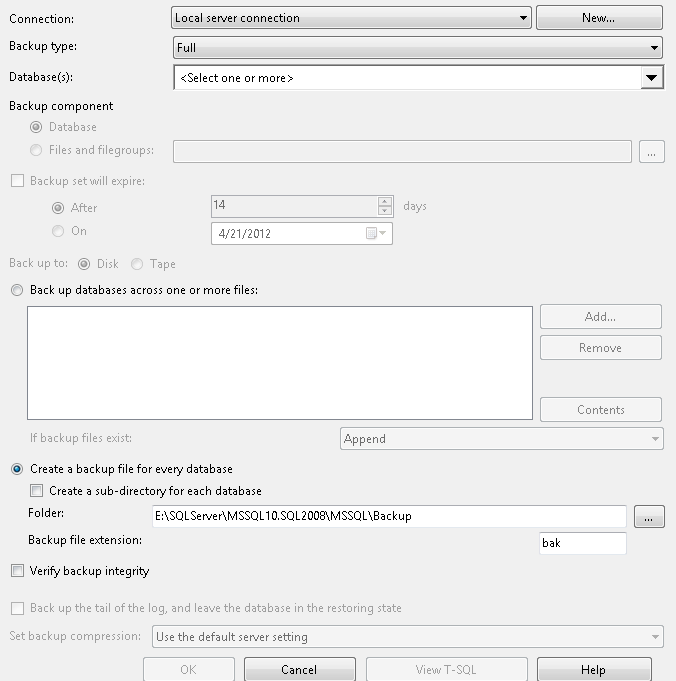
Repeat the same steps and drag the database backup task and configure it. Again right click on the task and configure your options. Here you can configure whether you want full, differential or transaction log backup, select one or more databases and define the location where you want to save the backup files. There is also an option called "Verify Backup Integrity" this shouldn't be confused with Database Integrity task which we configure in above step.


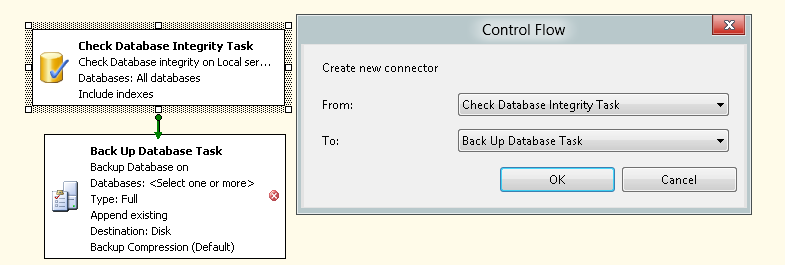
In this example, we want to ensure the integrity check is performed first before the database backup. Right click on either of the two task and select "Add Precedence Constraint" from the context menu and select the precedence you want.


That's all there is to it. Once you save your plan, SQL Server will automatically create a SQL Agent job to run your plan at the scheduled time.

If I had database mail setup, I can also add a third task "Notify Operator Task" as the last step which can send a notification email in the event of the task failure. See my previous post to learn about configure your SQL Server to send emails.

Thank you.


Wednesday, April 4, 2012

Database Normalization - Third Normal Form

In previous two posts we discussed First Normal Form and Second Normal Form. Today, we will discuss Third Normal Form.

Third Normal Form (3NF)
This rule breaks down the table structure a bit further. For a table to be in 3NF, it must also satisfy 1NF and 2NF. To make a 2NF table satisfy 3NF, remove the columns that don't fully depend on the primary key.

Imagine you have a payroll application which records the total hours an employee worked, the pay rate and total pay for the week. The following table schema can be used...

PayRoll

  • EmployeeID
  • WorkedDate
  • HoursWorked
  • PayRateID
  • Total
Let's see if this table satisfies 1NF and 2NF. There is no duplicate data in the same row. The Payroll table is associated to Employee table via EmployeeID and to PayRates via PayRateID. It has no redundant data, has a primary key (EmployeeID and WorkedDate), and foreign keys (EmployeeID and PayRateID). Thus, all conditions for 1NF and 2NF are satisfied.

What about 3NF? Is there any field here that doesn't depend on Primary Key? HoursWorked is fully dependent on EmployeeID and WorkedDate. Different Employees could work different number of hours on different dates. Also, PayrateID is fully dependent on Primary Key as well.

At first it may appear that PayrateID doesn't depend on WorkedDate but rather only on EmployeeID because an Employees' pay will be same day after day. But what if the Employee works on a holiday when they will be paid time and a half?

What about Total column? Total column is really HoursWorked * PayRate, hence it is a computed column and as such isn't fully dependent on primary key. For this table to be in 3NF, this column must be removed. So, where do you store this column? Actually no where. This is a computed column and you should compute it on the fly when retrieving the data.

As I mentioned in the first post about Normalization, the normalization goes up to 6NF and more normalization types may still be possible, but 3NF is generally the standard for most databases.

Thank you.


Monday, April 2, 2012

Database Normalization - Second Normal Form

In previous post we discussed the concept of Normalization and First Normal Form. Today, we will review Second Normal Form. You may want to refresh previous post before continuing on.

Second Normal Form (2NF)
2NF takes this concept  a bit further. This rule states that any data that is in multiple rows of the same table should be moved to a new table and the two tables should be joined via a foreign key. Basically, the idea is to reduce data redundancy by extracting redundant data and moving it elsewhere. Let's imagine you have a customers table that has the following columns

Customers
  • CustomerID
  • FirstName
  • LastName
  • Address
  • City
  • State
  • PostalCode
  • Country
Sure, you will have more than one customer from the same city, even more from the same state and definitely more from the same country. You may possibly have many customers from the same postal (zip) code. As you enter customers in this table, you are duplicating all this data i.e. City, State, PostalCode, Country etc. This table is not in 2NF. To make it 2NF compliant, create a new table and store City, State, PostalCode, Country. Let's call this table Addresses. This table has the following columns

Addresses
  • City
  • State
  • PostalCode
  • Country
What columns do you think could be redundant here? Sure PostalCode won't be, but what about City? A city could have multiple postal codes? Definitely a State can have multiple cities and Country will have multiple states. A good schema for all the tables may be the following...

Customers
  • CustomerID
  • StreetAddress
  • CityID
CityAddress
  • CityID
  • City
  • PostalCode
  • StateID
  • CountryID
States
  • StateID
  • State
Countries
  • CountryID
  • Country

Notice, one table resulted in 4 different tables. It is definitely more complex but more flexible. You can even pre-populate States and Countries in advance.

This schema also satisfies second rule of 2NF i.e. the related tables should be related by foreign key. CityID is a foreign key in Customers, StateID, CountryID are foreign keys in CityAddress table.

We will discuss 3NF in future post.

Thank you.